28 September 2022
React Flow 11 Release

A lot has happened since we published our last blog post six months ago. We got our first pro subscribers, we hired John who helps us with the docs, communication and community and we are all working full time on React Flow . Today we are releasing a new major version with lots of new features and very few breaking changes (unlike the last major update..).
If you are looking for the information how to upgrade, please refer to the “Migrate to v11” guide .
TLDR;
- React Flow has a new package name ->
reactflow - Better accessibility by default (keyboard controls, aria- defaults)
- Cleaner edge routing for smoothstep and step edges
- Better selectable edges with a new
interactionWidthoption - New hooks:
useNodesInitialized,useOnViewportChangeanduseOnSelectionChange
A New Package Name
The biggest change, is that we got a new package name! A very nice person gave us the
reactflow npm package name and we also got the
@reactflow organization. So from now on, you can
install React Flow via:
npm install reactflowand then use it as before:
import { ReactFlow,  Controls, Background } from '@xyflow/react';
import '@xyflow/react/dist/style.css';

...

<ReactFlow nodes={nodes} edges={edges}>
  <Controls />
  <Background />
</ReactFlow>
Looks nice, right? Under the hood we are publishing packages separately in the
@reactflow organization. These packages are used by the main reactflow package and
also can be used separately . For this
we’ve rebuilt React Flow to a monorepo powered by Turborepo ,
Rollup and Vite .
New Features
For this release, we focused on accessibility (nothing better for a v11 release than a11y!) and edges, with some other smaller updates and stability fixes along the way.
Accessibility
Accessibility was quite limited in the previous versions and we put a lot of work into it
to make it better by default. You can now interact with a flow with your keyboard. You can
focus nodes and edges with Tab, select an element with Enter and move nodes around
with the arrow keys.
Moreover we added default aria-labels to all elements on the pane and made them
configurable with new ariaLabel options for nodes and edges. You can refer to the new
Accessibility guide for more
information.
Edge Routing and Edge Selection
Whereas in v10, the nodes were a bit more in the spotlight, this time we’ve put a special
focus on the edges. A lot of people complained that thin edges are hard to select. We’ve
fixed that by introducing a new
interactionWidth edge option. Its
default value is 20, meaning that a 20px wide invisible edge gets painted below the
visible edge for an easier interaction.
Another big update is a complete rewrite of the edge routing for smoothstep and step
edge types.
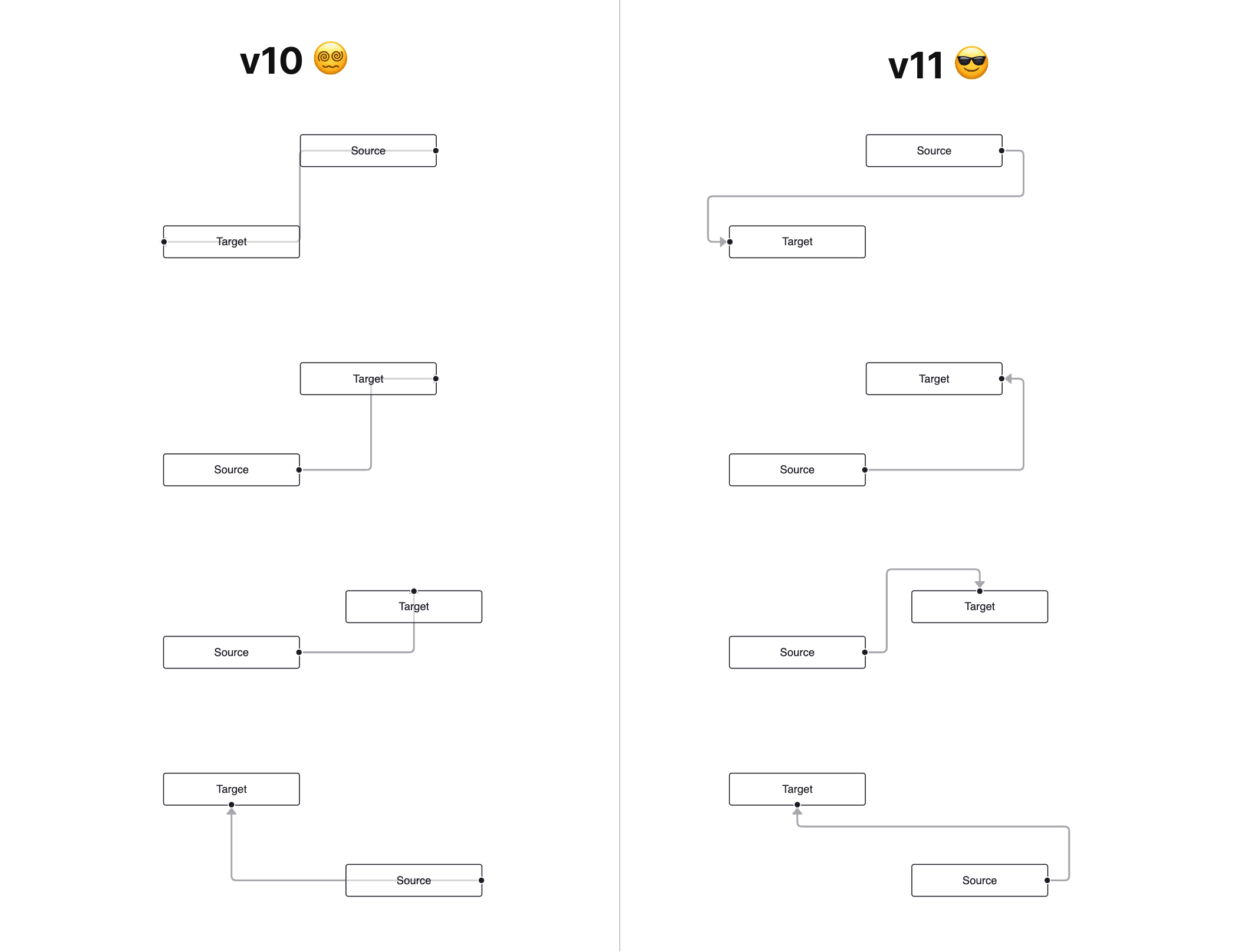
That’s not all. We also revised the edge
update behavior , added
pathOptions for default and
smoothstep edges and a new deletable flag. For making it easier to develop custom
edges we are exporting a
<BaseEdge /> component that
can draw the invisible helper edge and the label for you.
Node Positioning
To make layouting easier, we’ve added a new prop called
nodeOrigin. The origin was always in
the top left, meaning that you need to subtract half the width and height to center a
node. Now you can set nodeOrigin={[0.5, 0.5]} to set the origin to the center or
nodeOrigin={[1, 1]} to set it to the bottom right.
Furthermore we’ve implemented a
useNodesInitialized hook.
It returns a boolean that can be used to determine if all nodes are initialized and a new
layout should be done, for example. Another small change is that you can pan over a node
when it’s not draggable which makes it easier to navigate bigger flows.
New Hooks
In the future we want to get rid of some <ReactFlow /> component props (there are 140+
). One idea is to replace some props through hooks. With this
release we are adding the
useOnViewportChange
and the
useOnSelectionChange
hook. Before this release you could only listen to a viewport change by using
onMoveStart, onMove and onMoveEnd. With the new useOnViewportChange hook, you can
easily listen to changes in every component.
Miscellaneous
The background got a
new variant cross,
and you can control the gap size horizontally and vertically individually for all
variants. We’ve added new handlers that make it easier to add mouse event handlers to the
pane (the area below the nodes):
onPaneMouseEnter, onPaneMouseMove and onPaneMouseLeave.
Last but not least the cursor is a grabbing hand while dragging the pane or a node and you
pan over nodes when they are not draggable. Strange that this wasn’t always the case?!
What’s Next?
React Flow is not just the library. It’s the website with the docs and the examples, the pro platform and also the community on Github and Discord! In the upcoming weeks and months we want to make the onboarding for developers and especially beginner developers easier. For that we are working on an in-depth getting started guide and easier to understand docs in general. We are also re-brushing the pro platform so that you can get more out of the pro examples.
Thanks for being a part of the React Flow community, and happy coding!
1 November 2022
What’s new at React Flow - Fall 2022 🍂

A dispatch straight from our desks about what’s happened in the last couple of months at React Flow: updates, news, and a peek behind-the-scenes.
Read more15 March 2022
Releasing React Flow 10 and React Flow Pro

Almost two years ago we open sourced React Flow that was built for our flow-based data processing tool Datablocks. Since then we invested more and more time in React Flow and it got a lot of traction (25k+ website visitors per month, 9k+ stars on Github, 1k+ Discord members, 100k+ weekly downloads on npm).
Read more